
Managing cloud infrastructure efficiently has become a critical challenge for modern DevOps teams. While Kubernetes provides powerful orchestration capabilities, it often requires manual intervention for routine operational tasks like scaling resources based on schedules or cleaning up temporary resources. This is where Kubernetes operators shine — they extend Kubernetes’ native automation capabilities to handle complex, application-specific operations.
In this article, we’ll explore what Kubernetes operators are, why they’re essential for production environments, and walk through the development and practical implementation of the CronJob-Scale-Down-Operator — a real-world solution that addresses resource lifecycle management through automated scaling and cleanup.
The Operator Pattern
The operator pattern follows a simple but powerful concept:
- Observe: Watch the current state of resources in the cluster
- Analyze: Compare the current state with the desired state
- Act: Take corrective actions to align current state with desired state
- Repeat: Continuously monitor and adjust
This control loop is the foundation of Kubernetes’ declarative model, and operators extend this pattern to application-specific scenarios.
Why Build Custom Operators?
While Kubernetes provides basic resource management through Deployments, Services, and ConfigMaps, many operational tasks require domain-specific logic:
- Time-based operations: Scaling resources based on schedules, time zones, or business hours
- Resource lifecycle management: Automatically cleaning up temporary resources created by CI/CD pipelines
- Complex upgrade procedures: Managing stateful applications with specific upgrade sequences
- Cross-resource coordination: Orchestrating multiple Kubernetes resources as a single unit
Generic solutions often fall short because they can’t encode the nuanced operational knowledge that each application requires.
The CronJob-Scale-Down-Operator: Solving Real Problems
The Challenge
During my experience managing Kubernetes environments across multiple teams and time zones, I identified two recurring operational challenges:
Resource waste in non-production environments: Development and staging environments often run 24/7, consuming unnecessary compute resources during off-hours when no one is actively developing or testing.
Resource accumulation from CI/CD pipelines: Continuous integration processes create temporary resources (ConfigMaps, Secrets, test deployments) that accumulate over time, leading to namespace pollution and increased costs.
Existing solutions were either too generic (basic CronJobs that couldn’t handle complex scenarios) or too specific (custom scripts that were hard to maintain and didn’t integrate well with Kubernetes’ declarative model).
The Solution Architecture
The CronJob-Scale-Down-Operator addresses these challenges through two main capabilities:
Time-based Scaling: Automatically scale Deployments and StatefulSets based on cron schedules, supporting multiple time zones for global teams.
Annotation-driven Cleanup: Remove resources marked with cleanup annotations after specified time periods, enabling self-managing temporary resources.
📦 GitHub Repository: cronschedules/cronjob-scale-down-operator
Building with Kubebuilder
I chose Kubebuilder as the development framework because it provides:
- Scaffolding: Automated generation of operator boilerplate code
- API Definition: Easy creation of Custom Resource Definitions (CRDs)
- Controller Logic: Framework for implementing the reconciliation loop
- Testing Support: Built-in testing utilities and patterns
- Production Features: RBAC, webhooks, and deployment configurations
The development process involved defining the API structure, implementing the controller logic, and extensive testing across different scenarios.
Practical Implementation Examples
Let’s explore how the operator works in practice across different use cases:
Development Environment Cost Optimization
Development environments typically need resources only during business hours. The operator enables automatic scaling based on team schedules:
| |
This configuration automatically scales down development workloads outside business hours while ensuring they’re ready when developers arrive.
Weekend Environment Shutdown
For maximum resource efficiency, completely shut down non-production environments during weekends:
| |
Multi-Timezone Team Coordination
Global teams require different scaling schedules per region:
| |
Advanced Use Case: Cleanup-Only Mode
Beyond scaling, the operator provides standalone resource cleanup capabilities — particularly valuable for CI/CD pipeline management and test environment hygiene.
CI/CD Pipeline Resource Management
Continuous integration pipelines often create temporary resources that accumulate over time. The cleanup-only mode addresses this without requiring scaling targets:
| |
Resource Annotation Patterns
Resources are marked for cleanup using flexible annotation formats:
| |
Cleanup Time Format Options
The operator supports multiple time specification formats:
| |
Combined Scaling and Cleanup
Production scenarios often benefit from both scaling and cleanup in a single resource:
| |
Production Safety and Testing
Dry-Run Mode for Safety
Always validate cleanup operations before production deployment:
When dry-run mode is enabled, the operator logs all matching resources without performing deletions, allowing verification of cleanup logic.
Testing Scaling Schedules
Use frequent schedules for quick validation:
| |
Installation and Configuration
Helm Installation
Container Image Deployment
| |
Quick Validation
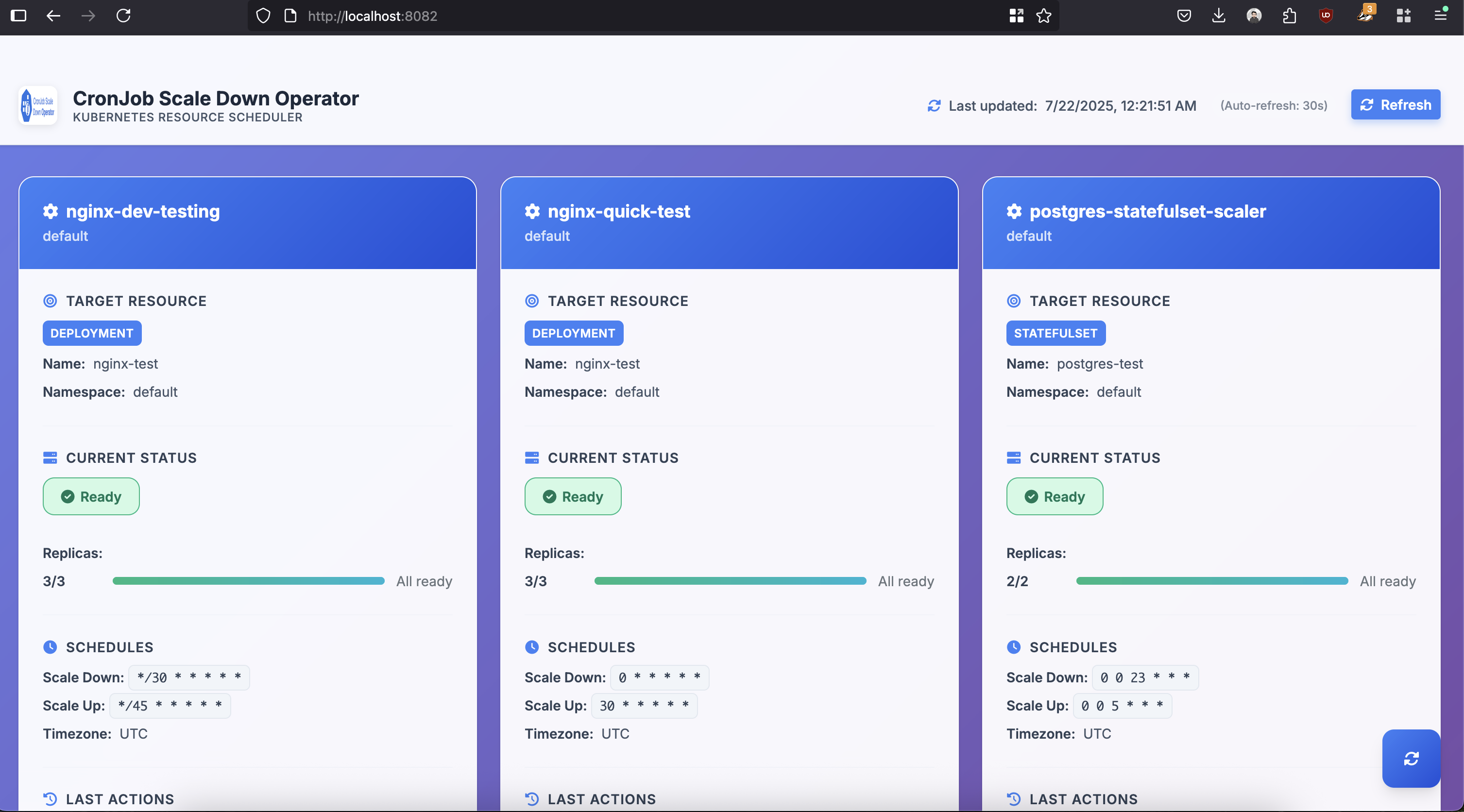
Web Dashboard Access
The operator includes a built-in web dashboard:
Schedule Configuration Reference
The operator uses 6-field cron expressions with second precision:
Common Schedule Patterns
| Pattern | Description |
|---|---|
"0 0 22 * * *" | Every day at 10:00 PM |
"0 0 6 * * 1-5" | Weekdays at 6:00 AM |
"0 0 18 * * 5" | Every Friday at 6:00 PM |
"0 0 0 * * 0" | Every Sunday at midnight |
"0 */6 * * * *" | Every 6 minutes |
"*/30 * * * * *" | Every 30 seconds (testing) |
Supported Resource Types
- Deployments: Standard application scaling
- StatefulSets: Database and stateful application scaling
- Cleanup targets: ConfigMaps, Secrets, Services, Jobs, CronJobs, Ingress, PersistentVolumeClaims
Conclusion
Kubernetes operators provide a robust framework for enhancing Kubernetes automation capabilities to meet specific operational requirements of applications. The CronJob-Scale-Down-Operator demonstrates how operators can address practical issues related to resource efficiency and lifecycle management.
Essential takeaways from this implementation:
- Operators tackle specific issues: The most effective operators focus on clearly identified operational problems instead of attempting to be all-encompassing solutions.
- Developer experience is important: Tools such as Kubebuilder greatly simplify operator development, enabling teams to concentrate on business logic instead of repetitive code.
- Safety in production is critical: Attributes such as dry-run mode and thorough monitoring are vital for safe operations in production settings.
Whether you want to optimize your cloud costs, improve operational efficiency, or better understand Kubernetes operator development, the methods and techniques covered here provide a solid foundation for creating production-ready automation solutions.
Resources: