
I recently attended the Cloud Native Days France 2026 conference in Paris, where Ricardo Rocha (Head of Infrastructure at CERN) opened the session with a talk titled “10 PB/s without breaking the budget.”
He explained in detail how the LHC upgrade forced them to process 10 petabytes of data per second with a fixed computing budget. The solution was not magical hardware, but rigorous resource isolation.
If strict resource limits are effective enough for particle physics, they are certainly effective enough for our production workloads.
Here is a practical guide to implementing CPU Pinning (static CPU manager policy) in any Kubernetes environment, from your laptop (Minikube) to the cloud (EKS) to bare metal.
The Problem — The “Noisy Neighbor”
By default, the kubelet uses CFS quota to enforce CPU limits. When a node runs many CPU-bound pods, workloads can migrate across CPU cores depending on throttling and which cores are available, which is often fine for typical services.
For latency-sensitive workloads, CPU migrations can hurt cache locality and increase scheduling variability (jitter). That’s why pinning can help.
a context switch doesn’t literally “flush” CPU caches in a simple on/off sense; the practical issue is usually reduced locality and more cache misses over time.
The Solution — The “static” CPU Manager Policy
Control CPU Management Policies on the Node
When kubelet CPU Manager runs with the static policy, it maintains:
- A shared CPU pool (for BestEffort/Burstable and fractional CPU requests), and
- exclusive CPU allocations for eligible containers.
Eligibility
A container gets exclusive CPUs only if it is:
- In a Guaranteed pod, and
- has an integer CPU request.
Guaranteed QoS criteria (container-level) are explicitly defined by Kubernetes: each container must have CPU+memory requests and limits, and the request must equal the limit for each resource.
(Extra reading) Datadog also describes the same “Guaranteed + integer cores → CPUSet” behavior (Link to DD article from)
Reserve CPU for the node
Kubelet requires a non-zero CPU reservation when static is enabled, using one of:
--kube-reserved/--system-reserved, or--reserved-cpus.
Kubernetes also notes that CPU reservations are taken in whole-CPU units from the shared pool.
1 — Configuration
1.1 — Local Environment (Minikube)
Enable CPU Manager static and reserve CPU for the system via kubelet extra config:
Make sure your Minikube VM has enough vCPUs to leave capacity for workloads after reservation.
1.2 — Managed K8s (EKS)
On EKS, nodes are ephemeral. We inject configuration during the bootstrap phase.
1.2.1 eksctl :
Option A: self-managed nodeGroups with kubeletExtraConfig.
eksctl documents kubeletExtraConfig as free-form YAML embedded into kubelet config, and shows reserving system/kube resources.
| |
Option B: managed nodegroups + custom AMI + overrideBootstrapCommand.
overrideBootstrapCommand can only be set when using a custom AMI, and when using a custom AMI it must be set for bootstrapping.
If you go this route, pass kubelet args via --kubelet-extra-args
| |
1.2.2 Terraform :
There are multiple valid ways to express kubelet config on EKS; the exact Terraform knobs depend on OS/AMI family (AL2 vs AL2023 vs Bottlerocket), module version, and whether you use AWS defaults or a custom launch template.
For the article’s purpose: it’s a small Terraform change.
Shape-only example using the module’s cloudinit_pre_nodeadm path (commonly used with AL2023 workflows): the module docs show cloudinit_pre_nodeadm for AL2023_* and a NodeConfig payload.
| |
1.2.3 “Bottlerocket” :
If you use Bottlerocket nodes, the same module documents that bootstrap_extra_args becomes additional Bottlerocket settings when ami_type = BOTTLEROCKET_*. Bottlerocket’s own settings reference documents settings.kubernetes.cpu-manager-policy and related knobs :
| |
1.3 Self-Hosted / On-Prem (Kubeadm)
Configure kubelet to use CPU Manager static and reserve resources. Kubernetes documents cpuManagerPolicy and the reservation mechanisms.
2 — Hands-On:
2.1 — Let’s create a fresh minikube cluster:
2.1 — Let’s deploy a floating and a pinned pod
- floating uses a fractional CPU request → stays in the shared pool under CPU Manager static.
- pinned is Guaranteed and requests an integer CPU → eligible for exclusive CPU allocation.
| |
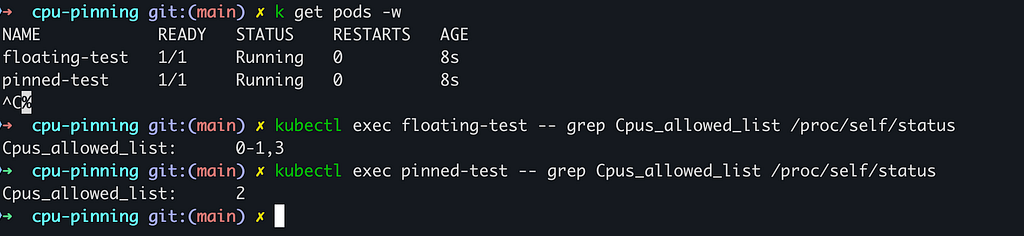
2.2 — Let’s now verify CPU affinity from inside the container
We check the kernel’s process scheduler to confirm pinning.
What to expect (without over-promising exact CPU IDs):
- The pinned pod typically shows a narrower CPU set (often a single CPU ID when requesting
cpu: "1"in our demo 2). - The floating pod typically shows a broader CPU set (here 0–1,3).
3 — Benchmark:
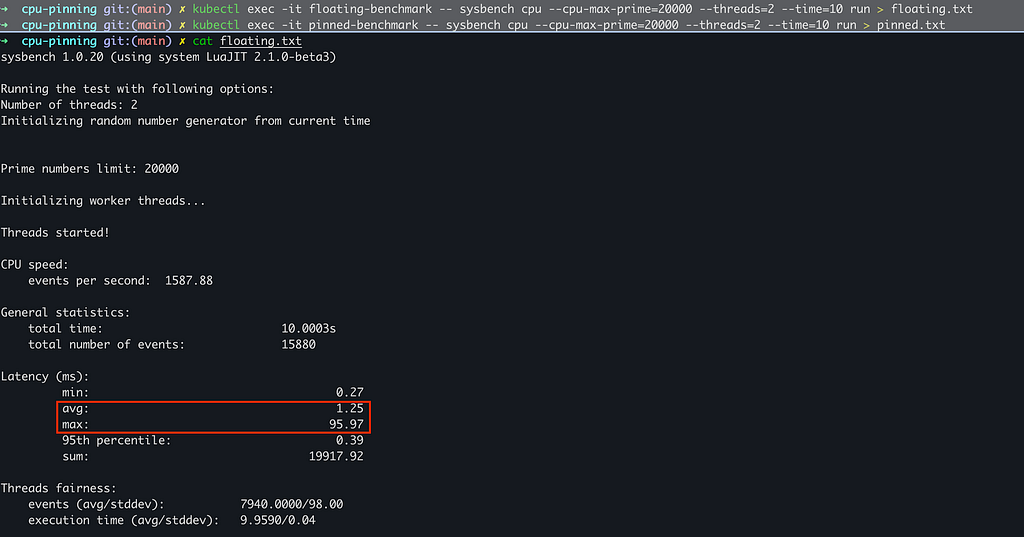
I used Sysbench to calculate prime numbers up to 20,000 using 2 threads. This is a CPU-bound test that is highly sensitive to cache locality and context switching.
Benchmark Pods
- a shared-pool pod (fractional CPU request → stays in the shared pool), and
- a Guaranteed, pinned pod (integer CPU request + request==limit → eligible for exclusive CPU allocation when CPU Manager is static).
| |

3.1 — The test
We calculated prime numbers on both pods for 10 seconds.
3.2 — The results
The difference was immediate and important.
Floating Pod Results :
Pinned Pod Results :
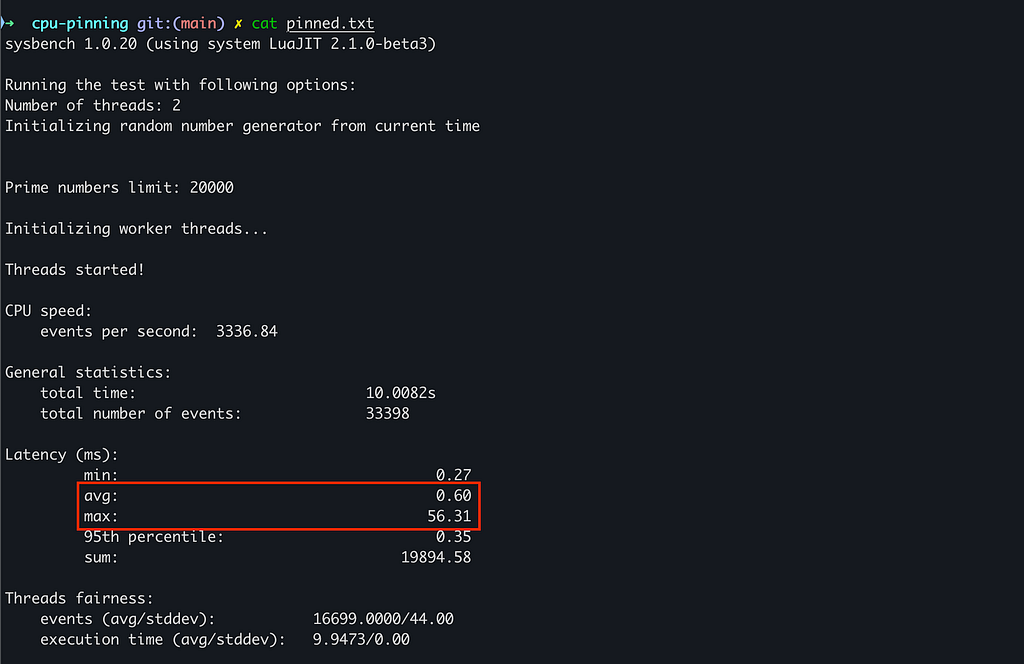
With a 1-CPU Guaranteed pinned pod, we measured 3336.84 events/sec, versus 1587.88 events/sec for a shared-pool pod limited to 0.5 CPU (a 2.10× throughput difference).
Latency improved too: average latency dropped from 1.25 ms → 0.60 ms, and worst-case latency improved from 95.97 ms → 56.31 ms in this run.
In a data-intensive workload (AI inference/training, HFT pipelines, high-throughput databases), that kind of step-change can translate into meaningful infrastructure savings when it lets you hit the same SLO with fewer nodes or fewer replicas — especially if it also reduces latency variance.
Conclusion
CPU pinning is no longer just for massive research facilities like CERN. With the static CPU Manager policy, you can bring stronger isolation characteristics to standard Kubernetes clusters.
Whether you are running on Minikube or EKS, remember the golden rule: kubelet policy changes are stateful. When switching CPU Manager policies, clear the cpu_manager_state checkpoint as part of a safe node change procedure — it can be the difference